Customize your status line
- Source ID:
src-20260420-04bc92864a31 - Kind:
document - Scope:
shared - Origin: https://code.claude.com/docs/en/statusline.md
- Raw path:
sources/raw/customize-your-status-line__src-20260420-04bc92864a31.md - Status:
active
Tags
official-docs claude-code-cli
Content
Documentation Index
Fetch the complete documentation index at: https://code.claude.com/docs/llms.txt Use this file to discover all available pages before exploring further.
Customize your status line
Configure a custom status bar to monitor context window usage, costs, and git status in Claude Code
The status line is a customizable bar at the bottom of Claude Code that runs any shell script you configure. It receives JSON session data on stdin and displays whatever your script prints, giving you a persistent, at-a-glance view of context usage, costs, git status, or anything else you want to track.
Status lines are useful when you:
- Want to monitor context window usage as you work
- Need to track session costs
- Work across multiple sessions and need to distinguish them
- Want git branch and status always visible
Here's an example of a multi-line status line that displays git info on the first line and a color-coded context bar on the second.
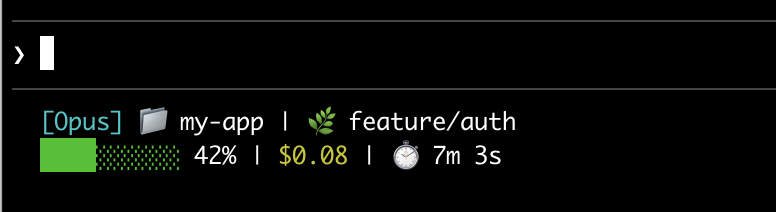
This page walks through setting up a basic status line, explains how the data flows from Claude Code to your script, lists all the fields you can display, and provides ready-to-use examples for common patterns like git status, cost tracking, and progress bars.
Set up a status line
Use the /statusline command to have Claude Code generate a script for you, or manually create a script and add it to your settings.
Use the /statusline command
The /statusline command accepts natural language instructions describing what you want displayed. Claude Code generates a script file in ~/.claude/ and updates your settings automatically:
```text theme={null} /statusline show model name and context percentage with a progress bar
### Manually configure a status line

Add a `statusLine` field to your user settings (`~/.claude/settings.json`, where `~` is your home directory) or [project settings](https://code.claude.com/en/settings#settings-files). Set `type` to `"command"` and point `command` to a script path or an inline shell command. For a full walkthrough of creating a script, see [Build a status line step by step](#build-a-status-line-step-by-step).

```json theme={null}
{
  "statusLine": {
    "type": "command",
    "command": "~/.claude/statusline.sh",
    "padding": 2
  }
}
The command field runs in a shell, so you can also use inline commands instead of a script file. This example uses jq to parse the JSON input and display the model name and context percentage:
```json theme={null} { "statusLine": { "type": "command", "command": "jq -r '\"[\(.model.display_name)] \(.context_window.used_percentage // 0)% context\"'" } }
The optional `padding` field adds extra horizontal spacing (in characters) to the status line content. Defaults to `0`. This padding is in addition to the interface's built-in spacing, so it controls relative indentation rather than absolute distance from the terminal edge.
The optional `refreshInterval` field re-runs your command every N seconds in addition to the [event-driven updates](#how-status-lines-work). The minimum is `1`. Set this when your status line shows time-based data such as a clock, or when background subagents change git state while the main session is idle. Leave it unset to run only on events.
### Disable the status line
Run `/statusline` and ask it to remove or clear your status line (e.g., `/statusline delete`, `/statusline clear`, `/statusline remove it`). You can also manually delete the `statusLine` field from your settings.json.
## Build a status line step by step
This walkthrough shows what's happening under the hood by manually creating a status line that displays the current model, working directory, and context window usage percentage.
<Note>Running [`/statusline`](#use-the-statusline-command) with a description of what you want configures all of this for you automatically.</Note>
These examples use Bash scripts, which work on macOS and Linux. On Windows, see [Windows configuration](#windows-configuration) for PowerShell and Git Bash examples.
<Frame>
<img src="https://mintcdn.com/claude-code/nibzesLaJVh4ydOq/images/statusline-quickstart.png?fit=max&auto=format&n=nibzesLaJVh4ydOq&q=85&s=696445e59ca0059213250651ad23db6b" alt="A status line showing model name, directory, and context percentage" width="726" height="164" data-path="images/statusline-quickstart.png" />
</Frame>
<Steps>
<Step title="Create a script that reads JSON and prints output">
Claude Code sends JSON data to your script via stdin. This script uses [`jq`](https://jqlang.github.io/jq/), a command-line JSON parser you may need to install, to extract the model name, directory, and context percentage, then prints a formatted line.
Save this to `~/.claude/statusline.sh` (where `~` is your home directory, such as `/Users/username` on macOS or `/home/username` on Linux):
```bash theme={null}
#!/bin/bash
# Read JSON data that Claude Code sends to stdin
input=$(cat)
# Extract fields using jq
MODEL=$(echo "$input" | jq -r '.model.display_name')
DIR=$(echo "$input" | jq -r '.workspace.current_dir')
# The "// 0" provides a fallback if the field is null
PCT=$(echo "$input" | jq -r '.context_window.used_percentage // 0' | cut -d. -f1)
# Output the status line - ${DIR##*/} extracts just the folder name
echo "[$MODEL] 📁 ${DIR##*/} | ${PCT}% context"
```
</Step>
<Step title="Make it executable">
Mark the script as executable so your shell can run it:
```bash theme={null}
chmod +x ~/.claude/statusline.sh
```
</Step>
<Step title="Add to settings">
Tell Claude Code to run your script as the status line. Add this configuration to `~/.claude/settings.json`, which sets `type` to `"command"` (meaning "run this shell command") and points `command` to your script:
```json theme={null}
{
"statusLine": {
"type": "command",
"command": "~/.claude/statusline.sh"
}
}
```
Your status line appears at the bottom of the interface. Settings reload automatically, but changes won't appear until your next interaction with Claude Code.
</Step>
</Steps>
## How status lines work
Claude Code runs your script and pipes [JSON session data](#available-data) to it via stdin. Your script reads the JSON, extracts what it needs, and prints text to stdout. Claude Code displays whatever your script prints.
**When it updates**
Your script runs after each new assistant message, when the permission mode changes, or when vim mode toggles. Updates are debounced at 300ms, meaning rapid changes batch together and your script runs once things settle. If a new update triggers while your script is still running, the in-flight execution is cancelled. If you edit your script, the changes won't appear until your next interaction with Claude Code triggers an update.
These triggers can go quiet when the main session is idle, for example while a coordinator waits on background subagents. To keep time-based or externally-sourced segments current during idle periods, set [`refreshInterval`](#manually-configure-a-status-line) to also re-run the command on a fixed timer.
**What your script can output**
* **Multiple lines**: each `echo` or `print` statement displays as a separate row. See the [multi-line example](#display-multiple-lines).
* **Colors**: use [ANSI escape codes](https://en.wikipedia.org/wiki/ANSI_escape_code#Colors) like `\033[32m` for green (terminal must support them). See the [git status example](#git-status-with-colors).
* **Links**: use [OSC 8 escape sequences](https://en.wikipedia.org/wiki/ANSI_escape_code#OSC) to make text clickable (Cmd+click on macOS, Ctrl+click on Windows/Linux). Requires a terminal that supports hyperlinks like iTerm2, Kitty, or WezTerm. See the [clickable links example](#clickable-links).
<Note>The status line runs locally and does not consume API tokens. It temporarily hides during certain UI interactions, including autocomplete suggestions, the help menu, and permission prompts.</Note>
## Available data
Claude Code sends the following JSON fields to your script via stdin:
| Field | Description |
| -------------------------------------------------------------------------------- | ------------------------------------------------------------------------------------------------------------------------------------------------------------------------------------------------------------------------------------------ |
| `model.id`, `model.display_name` | Current model identifier and display name |
| `cwd`, `workspace.current_dir` | Current working directory. Both fields contain the same value; `workspace.current_dir` is preferred for consistency with `workspace.project_dir`. |
| `workspace.project_dir` | Directory where Claude Code was launched, which may differ from `cwd` if the working directory changes during a session |
| `workspace.added_dirs` | Additional directories added via `/add-dir` or `--add-dir`. Empty array if none have been added |
| `workspace.git_worktree` | Git worktree name when the current directory is inside a linked worktree created with `git worktree add`. Absent in the main working tree. Populated for any git worktree, unlike `worktree.*` which applies only to `--worktree` sessions |
| `cost.total_cost_usd` | Estimated session cost in USD, computed client-side. May differ from your actual bill |
| `cost.total_duration_ms` | Total wall-clock time since the session started, in milliseconds |
| `cost.total_api_duration_ms` | Total time spent waiting for API responses in milliseconds |
| `cost.total_lines_added`, `cost.total_lines_removed` | Lines of code changed |
| `context_window.total_input_tokens`, `context_window.total_output_tokens` | Cumulative token counts across the session |
| `context_window.context_window_size` | Maximum context window size in tokens. 200000 by default, or 1000000 for models with extended context. |
| `context_window.used_percentage` | Pre-calculated percentage of context window used |
| `context_window.remaining_percentage` | Pre-calculated percentage of context window remaining |
| `context_window.current_usage` | Token counts from the last API call, described in [context window fields](#context-window-fields) |
| `exceeds_200k_tokens` | Whether the total token count (input, cache, and output tokens combined) from the most recent API response exceeds 200k. This is a fixed threshold regardless of actual context window size. |
| `rate_limits.five_hour.used_percentage`, `rate_limits.seven_day.used_percentage` | Percentage of the 5-hour or 7-day rate limit consumed, from 0 to 100 |
| `rate_limits.five_hour.resets_at`, `rate_limits.seven_day.resets_at` | Unix epoch seconds when the 5-hour or 7-day rate limit window resets |
| `session_id` | Unique session identifier |
| `session_name` | Custom session name set with the `--name` flag or `/rename`. Absent if no custom name has been set |
| `transcript_path` | Path to conversation transcript file |
| `version` | Claude Code version |
| `output_style.name` | Name of the current output style |
| `vim.mode` | Current vim mode (`NORMAL` or `INSERT`) when [vim mode](https://code.claude.com/en/interactive-mode#vim-editor-mode) is enabled |
| `agent.name` | Agent name when running with the `--agent` flag or agent settings configured |
| `worktree.name` | Name of the active worktree. Present only during `--worktree` sessions |
| `worktree.path` | Absolute path to the worktree directory |
| `worktree.branch` | Git branch name for the worktree (for example, `"worktree-my-feature"`). Absent for hook-based worktrees |
| `worktree.original_cwd` | The directory Claude was in before entering the worktree |
| `worktree.original_branch` | Git branch checked out before entering the worktree. Absent for hook-based worktrees |
<Accordion title="Full JSON schema">
Your status line command receives this JSON structure via stdin:
```json theme={null}
{
"cwd": "/current/working/directory",
"session_id": "abc123...",
"session_name": "my-session",
"transcript_path": "/path/to/transcript.jsonl",
"model": {
"id": "claude-opus-4-7",
"display_name": "Opus"
},
"workspace": {
"current_dir": "/current/working/directory",
"project_dir": "/original/project/directory",
"added_dirs": [],
"git_worktree": "feature-xyz"
},
"version": "2.1.90",
"output_style": {
"name": "default"
},
"cost": {
"total_cost_usd": 0.01234,
"total_duration_ms": 45000,
"total_api_duration_ms": 2300,
"total_lines_added": 156,
"total_lines_removed": 23
},
"context_window": {
"total_input_tokens": 15234,
"total_output_tokens": 4521,
"context_window_size": 200000,
"used_percentage": 8,
"remaining_percentage": 92,
"current_usage": {
"input_tokens": 8500,
"output_tokens": 1200,
"cache_creation_input_tokens": 5000,
"cache_read_input_tokens": 2000
}
},
"exceeds_200k_tokens": false,
"rate_limits": {
"five_hour": {
"used_percentage": 23.5,
"resets_at": 1738425600
},
"seven_day": {
"used_percentage": 41.2,
"resets_at": 1738857600
}
},
"vim": {
"mode": "NORMAL"
},
"agent": {
"name": "security-reviewer"
},
"worktree": {
"name": "my-feature",
"path": "/path/to/.claude/worktrees/my-feature",
"branch": "worktree-my-feature",
"original_cwd": "/path/to/project",
"original_branch": "main"
}
}
```
**Fields that may be absent** (not present in JSON):
* `session_name`: appears only when a custom name has been set with `--name` or `/rename`
* `workspace.git_worktree`: appears only when the current directory is inside a linked git worktree
* `vim`: appears only when vim mode is enabled
* `agent`: appears only when running with the `--agent` flag or agent settings configured
* `worktree`: appears only during `--worktree` sessions. When present, `branch` and `original_branch` may also be absent for hook-based worktrees
* `rate_limits`: appears only for Claude.ai subscribers (Pro/Max) after the first API response in the session. Each window (`five_hour`, `seven_day`) may be independently absent. Use `jq -r '.rate_limits.five_hour.used_percentage // empty'` to handle absence gracefully.
**Fields that may be `null`**:
* `context_window.current_usage`: `null` before the first API call in a session
* `context_window.used_percentage`, `context_window.remaining_percentage`: may be `null` early in the session
Handle missing fields with conditional access and null values with fallback defaults in your scripts.
</Accordion>
### Context window fields
The `context_window` object provides two ways to track context usage:
* **Cumulative totals** (`total_input_tokens`, `total_output_tokens`): sum of all tokens across the entire session, useful for tracking total consumption
* **Current usage** (`current_usage`): token counts from the most recent API call, use this for accurate context percentage since it reflects the actual context state
The `current_usage` object contains:
* `input_tokens`: input tokens in current context
* `output_tokens`: output tokens generated
* `cache_creation_input_tokens`: tokens written to cache
* `cache_read_input_tokens`: tokens read from cache
The `used_percentage` field is calculated from input tokens only: `input_tokens + cache_creation_input_tokens + cache_read_input_tokens`. It does not include `output_tokens`.
If you calculate context percentage manually from `current_usage`, use the same input-only formula to match `used_percentage`.
The `current_usage` object is `null` before the first API call in a session.
## Examples
These examples show common status line patterns. To use any example:
1. Save the script to a file like `~/.claude/statusline.sh` (or `.py`/`.js`)
2. Make it executable: `chmod +x ~/.claude/statusline.sh`
3. Add the path to your [settings](#manually-configure-a-status-line)
The Bash examples use [`jq`](https://jqlang.github.io/jq/) to parse JSON. Python and Node.js have built-in JSON parsing.
### Context window usage
Display the current model and context window usage with a visual progress bar. Each script reads JSON from stdin, extracts the `used_percentage` field, and builds a 10-character bar where filled blocks (▓) represent usage:
<Frame>
<img src="https://mintcdn.com/claude-code/nibzesLaJVh4ydOq/images/statusline-context-window-usage.png?fit=max&auto=format&n=nibzesLaJVh4ydOq&q=85&s=15b58ab3602f036939145dde3165c6f7" alt="A status line showing model name and a progress bar with percentage" width="448" height="152" data-path="images/statusline-context-window-usage.png" />
</Frame>
<CodeGroup>
```bash Bash theme={null}
#!/bin/bash
# Read all of stdin into a variable
input=$(cat)
# Extract fields with jq, "// 0" provides fallback for null
MODEL=$(echo "$input" | jq -r '.model.display_name')
PCT=$(echo "$input" | jq -r '.context_window.used_percentage // 0' | cut -d. -f1)
# Build progress bar: printf -v creates a run of spaces, then
# ${var// /▓} replaces each space with a block character
BAR_WIDTH=10
FILLED=$((PCT * BAR_WIDTH / 100))
EMPTY=$((BAR_WIDTH - FILLED))
BAR=""
[ "$FILLED" -gt 0 ] && printf -v FILL "%${FILLED}s" && BAR="${FILL// /▓}"
[ "$EMPTY" -gt 0 ] && printf -v PAD "%${EMPTY}s" && BAR="${BAR}${PAD// /░}"
echo "[$MODEL] $BAR $PCT%"
```
```python Python theme={null}
#!/usr/bin/env python3
import json, sys
# json.load reads and parses stdin in one step
data = json.load(sys.stdin)
model = data['model']['display_name']
# "or 0" handles null values
pct = int(data.get('context_window', {}).get('used_percentage', 0) or 0)
# String multiplication builds the bar
filled = pct * 10 // 100
bar = '▓' * filled + '░' * (10 - filled)
print(f"[{model}] {bar} {pct}%")
```
```javascript Node.js theme={null}
#!/usr/bin/env node
// Node.js reads stdin asynchronously with events
let input = '';
process.stdin.on('data', chunk => input += chunk);
process.stdin.on('end', () => {
const data = JSON.parse(input);
const model = data.model.display_name;
// Optional chaining (?.) safely handles null fields
const pct = Math.floor(data.context_window?.used_percentage || 0);
// String.repeat() builds the bar
const filled = Math.floor(pct * 10 / 100);
const bar = '▓'.repeat(filled) + '░'.repeat(10 - filled);
console.log(`[${model}] ${bar} ${pct}%`);
});
```
</CodeGroup>
### Git status with colors
Show git branch with color-coded indicators for staged and modified files. This script uses [ANSI escape codes](https://en.wikipedia.org/wiki/ANSI_escape_code#Colors) for terminal colors: `\033[32m` is green, `\033[33m` is yellow, and `\033[0m` resets to default.
<Frame>
<img src="https://mintcdn.com/claude-code/nibzesLaJVh4ydOq/images/statusline-git-context.png?fit=max&auto=format&n=nibzesLaJVh4ydOq&q=85&s=e656f34f90d1d9a1d0e220988914345f" alt="A status line showing model, directory, git branch, and colored indicators for staged and modified files" width="742" height="178" data-path="images/statusline-git-context.png" />
</Frame>
Each script checks if the current directory is a git repository, counts staged and modified files, and displays color-coded indicators:
<CodeGroup>
```bash Bash theme={null}
#!/bin/bash
input=$(cat)
MODEL=$(echo "$input" | jq -r '.model.display_name')
DIR=$(echo "$input" | jq -r '.workspace.current_dir')
GREEN='\033[32m'
YELLOW='\033[33m'
RESET='\033[0m'
if git rev-parse --git-dir > /dev/null 2>&1; then
BRANCH=$(git branch --show-current 2>/dev/null)
STAGED=$(git diff --cached --numstat 2>/dev/null | wc -l | tr -d ' ')
MODIFIED=$(git diff --numstat 2>/dev/null | wc -l | tr -d ' ')
GIT_STATUS=""
[ "$STAGED" -gt 0 ] && GIT_STATUS="${GREEN}+${STAGED}${RESET}"
[ "$MODIFIED" -gt 0 ] && GIT_STATUS="${GIT_STATUS}${YELLOW}~${MODIFIED}${RESET}"
echo -e "[$MODEL] 📁 ${DIR##*/} | 🌿 $BRANCH $GIT_STATUS"
else
echo "[$MODEL] 📁 ${DIR##*/}"
fi
```
```python Python theme={null}
#!/usr/bin/env python3
import json, sys, subprocess, os
data = json.load(sys.stdin)
model = data['model']['display_name']
directory = os.path.basename(data['workspace']['current_dir'])
GREEN, YELLOW, RESET = '\033[32m', '\033[33m', '\033[0m'
try:
subprocess.check_output(['git', 'rev-parse', '--git-dir'], stderr=subprocess.DEVNULL)
branch = subprocess.check_output(['git', 'branch', '--show-current'], text=True).strip()
staged_output = subprocess.check_output(['git', 'diff', '--cached', '--numstat'], text=True).strip()
modified_output = subprocess.check_output(['git', 'diff', '--numstat'], text=True).strip()
staged = len(staged_output.split('\n')) if staged_output else 0
modified = len(modified_output.split('\n')) if modified_output else 0
git_status = f"{GREEN}+{staged}{RESET}" if staged else ""
git_status += f"{YELLOW}~{modified}{RESET}" if modified else ""
print(f"[{model}] 📁 {directory} | 🌿 {branch} {git_status}")
except:
print(f"[{model}] 📁 {directory}")
```
```javascript Node.js theme={null}
#!/usr/bin/env node
const { execSync } = require('child_process');
const path = require('path');
let input = '';
process.stdin.on('data', chunk => input += chunk);
process.stdin.on('end', () => {
const data = JSON.parse(input);
const model = data.model.display_name;
const dir = path.basename(data.workspace.current_dir);
const GREEN = '\x1b[32m', YELLOW = '\x1b[33m', RESET = '\x1b[0m';
try {
execSync('git rev-parse --git-dir', { stdio: 'ignore' });
const branch = execSync('git branch --show-current', { encoding: 'utf8' }).trim();
const staged = execSync('git diff --cached --numstat', { encoding: 'utf8' }).trim().split('\n').filter(Boolean).length;
const modified = execSync('git diff --numstat', { encoding: 'utf8' }).trim().split('\n').filter(Boolean).length;
let gitStatus = staged ? `${GREEN}+${staged}${RESET}` : '';
gitStatus += modified ? `${YELLOW}~${modified}${RESET}` : '';
console.log(`[${model}] 📁 ${dir} | 🌿 ${branch} ${gitStatus}`);
} catch {
console.log(`[${model}] 📁 ${dir}`);
}
});
```
</CodeGroup>
### Cost and duration tracking
Track your session's API costs and elapsed time. The `cost.total_cost_usd` field accumulates the estimated cost of all API calls in the current session. The `cost.total_duration_ms` field measures total elapsed time since the session started, while `cost.total_api_duration_ms` tracks only the time spent waiting for API responses.
Each script formats cost as currency and converts milliseconds to minutes and seconds:
<Frame>
<img src="https://mintcdn.com/claude-code/nibzesLaJVh4ydOq/images/statusline-cost-tracking.png?fit=max&auto=format&n=nibzesLaJVh4ydOq&q=85&s=e3444a51fe6f3440c134bd5f1f08ad29" alt="A status line showing model name, session cost, and duration" width="588" height="180" data-path="images/statusline-cost-tracking.png" />
</Frame>
<CodeGroup>
```bash Bash theme={null}
#!/bin/bash
input=$(cat)
MODEL=$(echo "$input" | jq -r '.model.display_name')
COST=$(echo "$input" | jq -r '.cost.total_cost_usd // 0')
DURATION_MS=$(echo "$input" | jq -r '.cost.total_duration_ms // 0')
COST_FMT=$(printf '$%.2f' "$COST")
DURATION_SEC=$((DURATION_MS / 1000))
MINS=$((DURATION_SEC / 60))
SECS=$((DURATION_SEC % 60))
echo "[$MODEL] 💰 $COST_FMT | ⏱️ ${MINS}m ${SECS}s"
```
```python Python theme={null}
#!/usr/bin/env python3
import json, sys
data = json.load(sys.stdin)
model = data['model']['display_name']
cost = data.get('cost', {}).get('total_cost_usd', 0) or 0
duration_ms = data.get('cost', {}).get('total_duration_ms', 0) or 0
duration_sec = duration_ms // 1000
mins, secs = duration_sec // 60, duration_sec % 60
print(f"[{model}] 💰 ${cost:.2f} | ⏱️ {mins}m {secs}s")
```
```javascript Node.js theme={null}
#!/usr/bin/env node
let input = '';
process.stdin.on('data', chunk => input += chunk);
process.stdin.on('end', () => {
const data = JSON.parse(input);
const model = data.model.display_name;
const cost = data.cost?.total_cost_usd || 0;
const durationMs = data.cost?.total_duration_ms || 0;
const durationSec = Math.floor(durationMs / 1000);
const mins = Math.floor(durationSec / 60);
const secs = durationSec % 60;
console.log(`[${model}] 💰 $${cost.toFixed(2)} | ⏱️ ${mins}m ${secs}s`);
});
```
</CodeGroup>
### Display multiple lines
Your script can output multiple lines to create a richer display. Each `echo` statement produces a separate row in the status area.
<Frame>
<img src="https://mintcdn.com/claude-code/nibzesLaJVh4ydOq/images/statusline-multiline.png?fit=max&auto=format&n=nibzesLaJVh4ydOq&q=85&s=60f11387658acc9ff75158ae85f2ac87" alt="A multi-line status line showing model name, directory, git branch on the first line, and a context usage progress bar with cost and duration on the second line" width="776" height="212" data-path="images/statusline-multiline.png" />
</Frame>
This example combines several techniques: threshold-based colors (green under 70%, yellow 70-89%, red 90%+), a progress bar, and git branch info. Each `print` or `echo` statement creates a separate row:
<CodeGroup>
```bash Bash theme={null}
#!/bin/bash
input=$(cat)
MODEL=$(echo "$input" | jq -r '.model.display_name')
DIR=$(echo "$input" | jq -r '.workspace.current_dir')
COST=$(echo "$input" | jq -r '.cost.total_cost_usd // 0')
PCT=$(echo "$input" | jq -r '.context_window.used_percentage // 0' | cut -d. -f1)
DURATION_MS=$(echo "$input" | jq -r '.cost.total_duration_ms // 0')
CYAN='\033[36m'; GREEN='\033[32m'; YELLOW='\033[33m'; RED='\033[31m'; RESET='\033[0m'
# Pick bar color based on context usage
if [ "$PCT" -ge 90 ]; then BAR_COLOR="$RED"
elif [ "$PCT" -ge 70 ]; then BAR_COLOR="$YELLOW"
else BAR_COLOR="$GREEN"; fi
FILLED=$((PCT / 10)); EMPTY=$((10 - FILLED))
printf -v FILL "%${FILLED}s"; printf -v PAD "%${EMPTY}s"
BAR="${FILL// /█}${PAD// /░}"
MINS=$((DURATION_MS / 60000)); SECS=$(((DURATION_MS % 60000) / 1000))
BRANCH=""
git rev-parse --git-dir > /dev/null 2>&1 && BRANCH=" | 🌿 $(git branch --show-current 2>/dev/null)"
echo -e "${CYAN}[$MODEL]${RESET} 📁 ${DIR##*/}$BRANCH"
COST_FMT=$(printf '$%.2f' "$COST")
echo -e "${BAR_COLOR}${BAR}${RESET} ${PCT}% | ${YELLOW}${COST_FMT}${RESET} | ⏱️ ${MINS}m ${SECS}s"
```
```python Python theme={null}
#!/usr/bin/env python3
import json, sys, subprocess, os
data = json.load(sys.stdin)
model = data['model']['display_name']
directory = os.path.basename(data['workspace']['current_dir'])
cost = data.get('cost', {}).get('total_cost_usd', 0) or 0
pct = int(data.get('context_window', {}).get('used_percentage', 0) or 0)
duration_ms = data.get('cost', {}).get('total_duration_ms', 0) or 0
CYAN, GREEN, YELLOW, RED, RESET = '\033[36m', '\033[32m', '\033[33m', '\033[31m', '\033[0m'
bar_color = RED if pct >= 90 else YELLOW if pct >= 70 else GREEN
filled = pct // 10
bar = '█' * filled + '░' * (10 - filled)
mins, secs = duration_ms // 60000, (duration_ms % 60000) // 1000
try:
branch = subprocess.check_output(['git', 'branch', '--show-current'], text=True, stderr=subprocess.DEVNULL).strip()
branch = f" | 🌿 {branch}" if branch else ""
except:
branch = ""
print(f"{CYAN}[{model}]{RESET} 📁 {directory}{branch}")
print(f"{bar_color}{bar}{RESET} {pct}% | {YELLOW}${cost:.2f}{RESET} | ⏱️ {mins}m {secs}s")
```
```javascript Node.js theme={null}
#!/usr/bin/env node
const { execSync } = require('child_process');
const path = require('path');
let input = '';
process.stdin.on('data', chunk => input += chunk);
process.stdin.on('end', () => {
const data = JSON.parse(input);
const model = data.model.display_name;
const dir = path.basename(data.workspace.current_dir);
const cost = data.cost?.total_cost_usd || 0;
const pct = Math.floor(data.context_window?.used_percentage || 0);
const durationMs = data.cost?.total_duration_ms || 0;
const CYAN = '\x1b[36m', GREEN = '\x1b[32m', YELLOW = '\x1b[33m', RED = '\x1b[31m', RESET = '\x1b[0m';
const barColor = pct >= 90 ? RED : pct >= 70 ? YELLOW : GREEN;
const filled = Math.floor(pct / 10);
const bar = '█'.repeat(filled) + '░'.repeat(10 - filled);
const mins = Math.floor(durationMs / 60000);
const secs = Math.floor((durationMs % 60000) / 1000);
let branch = '';
try {
branch = execSync('git branch --show-current', { encoding: 'utf8', stdio: ['pipe', 'pipe', 'ignore'] }).trim();
branch = branch ? ` | 🌿 ${branch}` : '';
} catch {}
console.log(`${CYAN}[${model}]${RESET} 📁 ${dir}${branch}`);
console.log(`${barColor}${bar}${RESET} ${pct}% | ${YELLOW}$${cost.toFixed(2)}${RESET} | ⏱️ ${mins}m ${secs}s`);
});
```
</CodeGroup>
### Clickable links
This example creates a clickable link to your GitHub repository. It reads the git remote URL, converts SSH format to HTTPS with `sed`, and wraps the repo name in OSC 8 escape codes. Hold Cmd (macOS) or Ctrl (Windows/Linux) and click to open the link in your browser.
<Frame>
<img src="https://mintcdn.com/claude-code/nibzesLaJVh4ydOq/images/statusline-links.png?fit=max&auto=format&n=nibzesLaJVh4ydOq&q=85&s=4bcc6e7deb7cf52f41ab85a219b52661" alt="A status line showing a clickable link to a GitHub repository" width="726" height="198" data-path="images/statusline-links.png" />
</Frame>
Each script gets the git remote URL, converts SSH format to HTTPS, and wraps the repo name in OSC 8 escape codes. The Bash version uses `printf '%b'` which interprets backslash escapes more reliably than `echo -e` across different shells:
<CodeGroup>
```bash Bash theme={null}
#!/bin/bash
input=$(cat)
MODEL=$(echo "$input" | jq -r '.model.display_name')
# Convert git SSH URL to HTTPS
REMOTE=$(git remote get-url origin 2>/dev/null | sed 's/git@github.com:/https:\/\/github.com\//' | sed 's/\.git$//')
if [ -n "$REMOTE" ]; then
REPO_NAME=$(basename "$REMOTE")
# OSC 8 format: \e]8;;URL\a then TEXT then \e]8;;\a
# printf %b interprets escape sequences reliably across shells
printf '%b' "[$MODEL] 🔗 \e]8;;${REMOTE}\a${REPO_NAME}\e]8;;\a\n"
else
echo "[$MODEL]"
fi
```
```python Python theme={null}
#!/usr/bin/env python3
import json, sys, subprocess, re, os
data = json.load(sys.stdin)
model = data['model']['display_name']
# Get git remote URL
try:
remote = subprocess.check_output(
['git', 'remote', 'get-url', 'origin'],
stderr=subprocess.DEVNULL, text=True
).strip()
# Convert SSH to HTTPS format
remote = re.sub(r'^git@github\.com:', 'https://github.com/', remote)
remote = re.sub(r'\.git$', '', remote)
repo_name = os.path.basename(remote)
# OSC 8 escape sequences
link = f"\033]8;;{remote}\a{repo_name}\033]8;;\a"
print(f"[{model}] 🔗 {link}")
except:
print(f"[{model}]")
```
```javascript Node.js theme={null}
#!/usr/bin/env node
const { execSync } = require('child_process');
const path = require('path');
let input = '';
process.stdin.on('data', chunk => input += chunk);
process.stdin.on('end', () => {
const data = JSON.parse(input);
const model = data.model.display_name;
try {
let remote = execSync('git remote get-url origin', { encoding: 'utf8', stdio: ['pipe', 'pipe', 'ignore'] }).trim();
// Convert SSH to HTTPS format
remote = remote.replace(/^git@github\.com:/, 'https://github.com/').replace(/\.git$/, '');
const repoName = path.basename(remote);
// OSC 8 escape sequences
const link = `\x1b]8;;${remote}\x07${repoName}\x1b]8;;\x07`;
console.log(`[${model}] 🔗 ${link}`);
} catch {
console.log(`[${model}]`);
}
});
```
</CodeGroup>
### Rate limit usage
Display Claude.ai subscription rate limit usage in the status line. The `rate_limits` object contains `five_hour` (5-hour rolling window) and `seven_day` (weekly) windows. Each window provides `used_percentage` (0-100) and `resets_at` (Unix epoch seconds when the window resets).
This field is only present for Claude.ai subscribers (Pro/Max) after the first API response. Each script handles the absent field gracefully:
<CodeGroup>
```bash Bash theme={null}
#!/bin/bash
input=$(cat)
MODEL=$(echo "$input" | jq -r '.model.display_name')
# "// empty" produces no output when rate_limits is absent
FIVE_H=$(echo "$input" | jq -r '.rate_limits.five_hour.used_percentage // empty')
WEEK=$(echo "$input" | jq -r '.rate_limits.seven_day.used_percentage // empty')
LIMITS=""
[ -n "$FIVE_H" ] && LIMITS="5h: $(printf '%.0f' "$FIVE_H")%"
[ -n "$WEEK" ] && LIMITS="${LIMITS:+$LIMITS }7d: $(printf '%.0f' "$WEEK")%"
[ -n "$LIMITS" ] && echo "[$MODEL] | $LIMITS" || echo "[$MODEL]"
```
```python Python theme={null}
#!/usr/bin/env python3
import json, sys
data = json.load(sys.stdin)
model = data['model']['display_name']
parts = []
rate = data.get('rate_limits', {})
five_h = rate.get('five_hour', {}).get('used_percentage')
week = rate.get('seven_day', {}).get('used_percentage')
if five_h is not None:
parts.append(f"5h: {five_h:.0f}%")
if week is not None:
parts.append(f"7d: {week:.0f}%")
if parts:
print(f"[{model}] | {' '.join(parts)}")
else:
print(f"[{model}]")
```
```javascript Node.js theme={null}
#!/usr/bin/env node
let input = '';
process.stdin.on('data', chunk => input += chunk);
process.stdin.on('end', () => {
const data = JSON.parse(input);
const model = data.model.display_name;
const parts = [];
const fiveH = data.rate_limits?.five_hour?.used_percentage;
const week = data.rate_limits?.seven_day?.used_percentage;
if (fiveH != null) parts.push(`5h: ${Math.round(fiveH)}%`);
if (week != null) parts.push(`7d: ${Math.round(week)}%`);
console.log(parts.length ? `[${model}] | ${parts.join(' ')}` : `[${model}]`);
});
```
</CodeGroup>
### Cache expensive operations
Your status line script runs frequently during active sessions. Commands like `git status` or `git diff` can be slow, especially in large repositories. This example caches git information to a temp file and only refreshes it every 5 seconds.
The cache filename needs to be stable across status line invocations within a session, but unique across sessions so concurrent sessions in different repositories don't read each other's cached git state. Process-based identifiers like `$$`, `os.getpid()`, or `process.pid` change on every invocation and defeat the cache. Use the `session_id` from the JSON input instead: it's stable for the lifetime of a session and unique per session.
Each script checks if the cache file is missing or older than 5 seconds before running git commands:
<CodeGroup>
```bash Bash theme={null}
#!/bin/bash
input=$(cat)
MODEL=$(echo "$input" | jq -r '.model.display_name')
DIR=$(echo "$input" | jq -r '.workspace.current_dir')
SESSION_ID=$(echo "$input" | jq -r '.session_id')
CACHE_FILE="/tmp/statusline-git-cache-$SESSION_ID"
CACHE_MAX_AGE=5 # seconds
cache_is_stale() {
[ ! -f "$CACHE_FILE" ] || \
# stat -f %m is macOS, stat -c %Y is Linux
[ $(($(date +%s) - $(stat -f %m "$CACHE_FILE" 2>/dev/null || stat -c %Y "$CACHE_FILE" 2>/dev/null || echo 0))) -gt $CACHE_MAX_AGE ]
}
if cache_is_stale; then
if git rev-parse --git-dir > /dev/null 2>&1; then
BRANCH=$(git branch --show-current 2>/dev/null)
STAGED=$(git diff --cached --numstat 2>/dev/null | wc -l | tr -d ' ')
MODIFIED=$(git diff --numstat 2>/dev/null | wc -l | tr -d ' ')
echo "$BRANCH|$STAGED|$MODIFIED" > "$CACHE_FILE"
else
echo "||" > "$CACHE_FILE"
fi
fi
IFS='|' read -r BRANCH STAGED MODIFIED < "$CACHE_FILE"
if [ -n "$BRANCH" ]; then
echo "[$MODEL] 📁 ${DIR##*/} | 🌿 $BRANCH +$STAGED ~$MODIFIED"
else
echo "[$MODEL] 📁 ${DIR##*/}"
fi
```
```python Python theme={null}
#!/usr/bin/env python3
import json, sys, subprocess, os, time
data = json.load(sys.stdin)
model = data['model']['display_name']
directory = os.path.basename(data['workspace']['current_dir'])
session_id = data['session_id']
CACHE_FILE = f"/tmp/statusline-git-cache-{session_id}"
CACHE_MAX_AGE = 5 # seconds
def cache_is_stale():
if not os.path.exists(CACHE_FILE):
return True
return time.time() - os.path.getmtime(CACHE_FILE) > CACHE_MAX_AGE
if cache_is_stale():
try:
subprocess.check_output(['git', 'rev-parse', '--git-dir'], stderr=subprocess.DEVNULL)
branch = subprocess.check_output(['git', 'branch', '--show-current'], text=True).strip()
staged = subprocess.check_output(['git', 'diff', '--cached', '--numstat'], text=True).strip()
modified = subprocess.check_output(['git', 'diff', '--numstat'], text=True).strip()
staged_count = len(staged.split('\n')) if staged else 0
modified_count = len(modified.split('\n')) if modified else 0
with open(CACHE_FILE, 'w') as f:
f.write(f"{branch}|{staged_count}|{modified_count}")
except:
with open(CACHE_FILE, 'w') as f:
f.write("||")
with open(CACHE_FILE) as f:
branch, staged, modified = f.read().strip().split('|')
if branch:
print(f"[{model}] 📁 {directory} | 🌿 {branch} +{staged} ~{modified}")
else:
print(f"[{model}] 📁 {directory}")
```
```javascript Node.js theme={null}
#!/usr/bin/env node
const { execSync } = require('child_process');
const fs = require('fs');
const path = require('path');
let input = '';
process.stdin.on('data', chunk => input += chunk);
process.stdin.on('end', () => {
const data = JSON.parse(input);
const model = data.model.display_name;
const dir = path.basename(data.workspace.current_dir);
const sessionId = data.session_id;
const CACHE_FILE = `/tmp/statusline-git-cache-${sessionId}`;
const CACHE_MAX_AGE = 5; // seconds
const cacheIsStale = () => {
if (!fs.existsSync(CACHE_FILE)) return true;
return (Date.now() / 1000) - fs.statSync(CACHE_FILE).mtimeMs / 1000 > CACHE_MAX_AGE;
};
if (cacheIsStale()) {
try {
execSync('git rev-parse --git-dir', { stdio: 'ignore' });
const branch = execSync('git branch --show-current', { encoding: 'utf8' }).trim();
const staged = execSync('git diff --cached --numstat', { encoding: 'utf8' }).trim().split('\n').filter(Boolean).length;
const modified = execSync('git diff --numstat', { encoding: 'utf8' }).trim().split('\n').filter(Boolean).length;
fs.writeFileSync(CACHE_FILE, `${branch}|${staged}|${modified}`);
} catch {
fs.writeFileSync(CACHE_FILE, '||');
}
}
const [branch, staged, modified] = fs.readFileSync(CACHE_FILE, 'utf8').trim().split('|');
if (branch) {
console.log(`[${model}] 📁 ${dir} | 🌿 ${branch} +${staged} ~${modified}`);
} else {
console.log(`[${model}] 📁 ${dir}`);
}
});
```
</CodeGroup>
### Windows configuration
On Windows, Claude Code runs status line commands through Git Bash. You can invoke PowerShell from that shell:
<CodeGroup>
```json settings.json theme={null}
{
"statusLine": {
"type": "command",
"command": "powershell -NoProfile -File C:/Users/username/.claude/statusline.ps1"
}
}
```
```powershell statusline.ps1 theme={null}
$input_json = $input | Out-String | ConvertFrom-Json
$cwd = $input_json.cwd
$model = $input_json.model.display_name
$used = $input_json.context_window.used_percentage
$dirname = Split-Path $cwd -Leaf
if ($used) {
Write-Host "$dirname [$model] ctx: $used%"
} else {
Write-Host "$dirname [$model]"
}
```
</CodeGroup>
Or run a Bash script directly:
<CodeGroup>
```json settings.json theme={null}
{
"statusLine": {
"type": "command",
"command": "~/.claude/statusline.sh"
}
}
```
```bash statusline.sh theme={null}
#!/usr/bin/env bash
input=$(cat)
cwd=$(echo "$input" | grep -o '"cwd":"[^"]*"' | cut -d'"' -f4)
model=$(echo "$input" | grep -o '"display_name":"[^"]*"' | cut -d'"' -f4)
dirname="${cwd##*[/\\]}"
echo "$dirname [$model]"
```
</CodeGroup>
## Subagent status lines
The `subagentStatusLine` setting renders a custom row body for each [subagent](https://code.claude.com/en/sub-agents) shown in the agent panel below the prompt. Use it to replace the default `name · description · token count` row with your own formatting.
```json theme={null}
{
"subagentStatusLine": {
"type": "command",
"command": "~/.claude/subagent-statusline.sh"
}
}
The command runs once per refresh tick with all visible subagent rows passed as a single JSON object on stdin. The input includes the base hook fields plus columns (the usable row width) and a tasks array, where each task has id, name, type, status, description, label, startTime, tokenCount, tokenSamples, and cwd.
Write one JSON line to stdout per row you want to override, in the form {"id": "<task id>", "content": "<row body>"}. The content string is rendered as-is, including ANSI colors and OSC 8 hyperlinks. Omit a task's id to keep the default rendering for that row; emit an empty content string to hide it.
The same trust and disableAllHooks gates that apply to statusLine apply here. Plugins can ship a default subagentStatusLine in their settings.json.
Tips
- Test with mock input:
echo '{"model":{"display_name":"Opus"},"workspace":{"current_dir":"/home/user/project"},"context_window":{"used_percentage":25},"session_id":"test-session-abc"}' | ./statusline.sh - Keep output short: the status bar has limited width, so long output may get truncated or wrap awkwardly
- Cache slow operations: your script runs frequently during active sessions, so commands like
git statuscan cause lag. See the caching example for how to handle this.
Community projects like ccstatusline and starship-claude provide pre-built configurations with themes and additional features.
Troubleshooting
Status line not appearing
- Verify your script is executable:
chmod +x ~/.claude/statusline.sh - Check that your script outputs to stdout, not stderr
- Run your script manually to verify it produces output
- If
disableAllHooksis set totruein your settings, the status line is also disabled. Remove this setting or set it tofalseto re-enable. - Run
claude --debugto log the exit code and stderr from the first status line invocation in a session - Ask Claude to read your settings file and execute the
statusLinecommand directly to surface errors
Status line shows -- or empty values
- Fields may be
nullbefore the first API response completes - Handle null values in your script with fallbacks such as
// 0in jq - Restart Claude Code if values remain empty after multiple messages
Context percentage shows unexpected values
- Use
used_percentagefor accurate context state rather than cumulative totals - The
total_input_tokensandtotal_output_tokensare cumulative across the session and may exceed the context window size - Context percentage may differ from
/contextoutput due to when each is calculated
OSC 8 links not clickable
-
Verify your terminal supports OSC 8 hyperlinks (iTerm2, Kitty, WezTerm)
-
Terminal.app does not support clickable links
-
If link text appears but isn't clickable, Claude Code may not have detected hyperlink support in your terminal. This commonly affects Windows Terminal and other emulators not in the auto-detection list. Set the
FORCE_HYPERLINKenvironment variable to override detection before launching Claude Code:
bash theme={null}
  FORCE_HYPERLINK=1 claude
In PowerShell, set the variable in the current session first:
powershell theme={null}
  $env:FORCE_HYPERLINK = "1"; claude
-
SSH and tmux sessions may strip OSC sequences depending on configuration
-
If escape sequences appear as literal text like
\e]8;;, useprintf '%b'instead ofecho -efor more reliable escape handling
Display glitches with escape sequences
- Complex escape sequences (ANSI colors, OSC 8 links) can occasionally cause garbled output if they overlap with other UI updates
- If you see corrupted text, try simplifying your script to plain text output
- Multi-line status lines with escape codes are more prone to rendering issues than single-line plain text
Workspace trust required
- The status line command only runs if you've accepted the workspace trust dialog for the current directory. Because
statusLineexecutes a shell command, it requires the same trust acceptance as hooks and other shell-executing settings. - If trust isn't accepted, you'll see the notification
statusline skipped · restart to fixinstead of your status line output. Restart Claude Code and accept the trust prompt to enable it.
Script errors or hangs
- Scripts that exit with non-zero codes or produce no output cause the status line to go blank
- Slow scripts block the status line from updating until they complete. Keep scripts fast to avoid stale output.
- If a new update triggers while a slow script is running, the in-flight script is cancelled
- Test your script independently with mock input before configuring it
Notifications share the status line row
- System notifications like MCP server errors and auto-updates display on the right side of the same row as your status line. Transient notifications such as the context-low warning also cycle through this area.
- Enabling verbose mode adds a token counter to this area
- On narrow terminals, these notifications may truncate your status line output